💸 Your Expense System Is Silently Costing You £25,000+ Per Year
A 10-Person Team with Manual Expenses. Every Month.
- Finance manager spends 18 hours chasing receipts from employees
- Accountant charges £180/quarter to reconcile messy expense records
- HMRC rejected £2,400 of VAT reclaims — receipts missing or illegible
- P11D filed three months late because benefits in kind were not tracked — £300 penalty
- 40% of legitimate business expenses never claimed — lost in coat pockets, email inboxes, “I’ll find that receipt later”
✅ Three Tools. £130–180/Month. £25,000/Year Problem Solved.
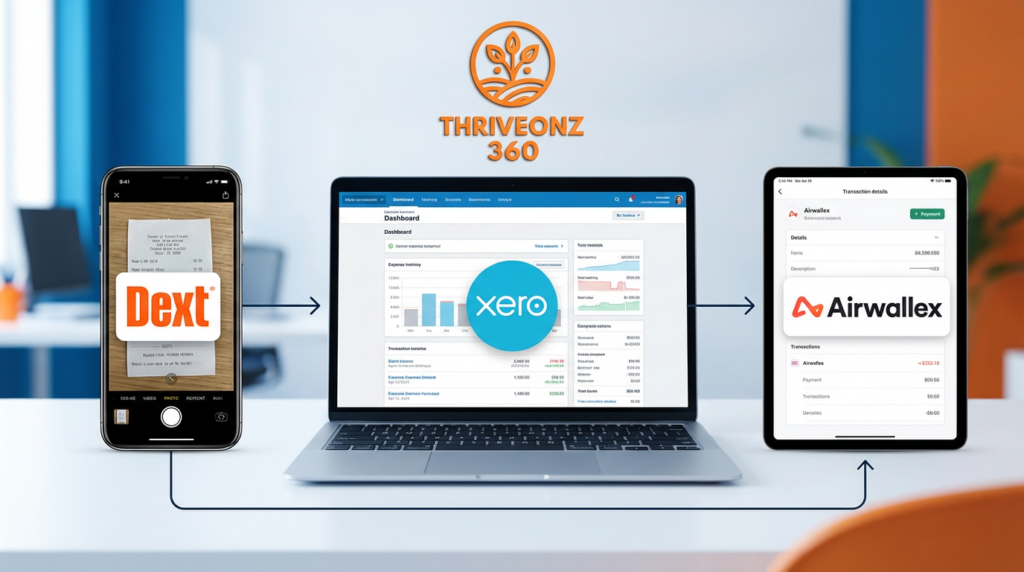
Dext — captures receipts via photo, email, or SMS; AI extracts supplier, date, amount, and VAT in seconds
Xero — processes expenses into accounting records, calculates reclaimable VAT, tracks PAYE categories, generates P11D reports
Airwallex — multi-currency business accounts and employee cards with transactions syncing directly to Dext
This is a system architecture fix — not an employee discipline problem.
📋 UK SME Expense Management — The Numbers
£27,860/yr
Annual waste from manual expense processing for a 10-person team (finance time + lost VAT + penalties + accountant fees)
£2,064/yr
Total cost of the Dext + Xero + Airwallex stack for a 10-person team — all three tools combined
95%
Reduction in monthly expense processing time — from 30–50 hours/month to 2–5 hours with full automation
1,100% ROI
Net annual saving of £25,536 vs. stack cost of £2,064 — based on 10-person team calculation in this guide
⚡ Quick Actions
- Dext UK — 14-Day Free Trial + 20% Off First Year (ThriveOnz360 Members) → — AI receipt capture, 15,000+ UK supplier recognition, 6-year HMRC-compliant storage
- Xero — 30-Day Free Trial + 50% Off First 6 Months → — MTD VAT, expense management, P11D reports, UK bank feeds
- Airwallex — £0 Setup + 3 Free Physical Cards (ThriveOnz360 Members) → — multi-currency business account, employee cards, Xero bank feed
- Best Accounting Software UK 2026 → — compare Xero vs QuickBooks vs FreeAgent for your situation
- How to Set Up Xero for UK SMEs → — step-by-step Xero configuration guide
- Making Tax Digital for Small Business 2026 → — MTD compliance obligations this stack satisfies
The UK Expense Management Problem — What Breaks Without Automation
Receipt Management Failures
- 20–30% of paper receipts never reach finance
- Email receipts buried in inboxes — never forwarded to accounts
- Phone photos taken but never extracted or categorised
- HMRC requires 6-year retention — paper degrades, digital scattered
VAT Reclaim Losses
- Missing receipts = cannot reclaim VAT (20% rate means £200 lost per £1,000 expense)
- Illegible receipts rejected by HMRC
- VAT not extracted from receipts — manual calculation errors
- Quarterly VAT return missing 20–35% of reclaimable VAT
PAYE Compliance Failures
- Business vs. personal expense distinction unclear — P11D errors
- Mileage claims use wrong rates (45p correct; employees claim 40p or 50p)
- Benefits in kind not tracked — late P11D = £300 penalty per 50 employees
- Entertainment expenses not flagged — different tax treatment, VAT not reclaimable
Manual Processing Waste (10-Person Team)
- Finance: 30–50 hours/month manually entering expense data
- Accountant: 3–6 hours/month reconciling messy records at £60–100/hour
- Employees: 2–3 hours/month each compiling expense reports
- Total waste: £1,000–2,100/month = £12,000–25,200/year
The Stack: Why These Three Tools Together
Dext
Receipt Capture and AI Extraction
- Captures receipts via mobile photo, email forwarding, or SMS
- AI extracts: supplier, date, gross amount, net amount, VAT, payment method, currency
- Recognises 15,000+ UK suppliers (Tesco, BP, Trainline, Uber, HMRC, Royal Mail)
- Stores receipts for 6+ years — HMRC compliance built in
- Two-way sync with Xero — zero manual data entry
Xero
Accounting and Compliance Hub
- Receives expenses from Dext, categorises, applies correct VAT codes
- Calculates reclaimable VAT — auto-populates Box 4 of VAT return
- Tracks PAYE expense categories (business vs. benefits in kind)
- Connects to 20+ UK banks including Airwallex via Open Banking
- Submits MTD VAT returns and generates P11D reports
Airwallex
Multi-Currency Banking and Corporate Cards
- UK GBP business account (FCA-regulated, FSCS-protected to £85,000)
- Employee debit cards with spending limits per card
- Card expenses auto-sync to Dext — prompts for receipt on every transaction
- Real-time Xero bank feed via Open Banking
- 50+ currencies at mid-market + 0.3–0.6% (vs. 3–5% at high street banks)
How the Three Tools Connect
Dext ↔ Xero
Receipt captured in Dext → appears in Xero as expense → VAT calculated automatically → reconciles to bank feed. Two-way sync eliminates manual data entry.
Airwallex ↔ Xero
Bank feeds sync daily. Card transactions appear in Xero reconciliation screen → match to Dext receipt → one-click reconcile. Automated bank reconciliation.
Dext ↔ Airwallex
Employee swipes Airwallex card → Dext sends SMS/email “Upload receipt for £45.20 at Tesco” → employee photos receipt → Dext links receipt to transaction. Zero missed receipts.
Result: Receipts captured → Data extracted → VAT calculated → Bank reconciled → HMRC compliant. Zero manual data entry.
ThriveOnz 360 — Growth Plan
Dext + Xero + Airwallex — Exclusive Member Rates
Growth members: Dext 14-day free trial + 20% off year 1. Xero 30-day free trial + 50% off first 6 months. Airwallex £0 setup + 3 free physical cards. Plus: UK Expense Policy Template, Mileage Log Template, VAT Reclaim Checklist, P11D Reporting Guide, and 45-minute video setup walkthrough. Free to join.
Tool 1: Dext — Receipt Capture and AI Extraction
Five Ways Employees Submit Receipts
- Mobile app: Photo receipt with phone camera (iOS/Android)
- Email: Forward receipt to unique Dext email address (receipts@client.dextprepare.com)
- SMS: Text photo of receipt to UK mobile number
- Desktop: Drag-and-drop PDFs or images
- Fetch: Dext retrieves receipts automatically from 500+ UK suppliers (Amazon, Uber, Just Eat, Trainline) — no employee action needed
What Dext’s AI Extracts (UK-Specific)
- Supplier name (recognises 15,000+ UK suppliers including local shops and fuel stations)
- Date (handles UK format: DD/MM/YYYY)
- Gross amount, net amount, and VAT amount extracted separately
- VAT rate: 20% standard, 5% reduced, 0% zero-rated — detected automatically
- Payment method (cash, card, bank transfer)
- Currency (GBP, EUR, USD for international expenses)
UK Supplier Recognition Examples
Dext Pricing (UK) — Choose by Team Size
| Plan | Price | Items/Month | Users |
| Starter | £15/month | 30 | 1 |
| Growth | £35/month | 100 | 2 |
| Established | £60/month | 250 | 5 |
| Advanced ← 10-person team | £110/month | 1,000 | 10 |
14-day free trial. ThriveOnz360 Growth members: 20% off first year.
Tool 2: Xero — Accounting and Compliance Hub
Xero’s Role in the Expense Stack
- Receives expenses from Dext automatically — no re-entry
- Categorises expenses (Travel, Subsistence, Office, Motor Expenses)
- Applies correct VAT codes (20%, 5%, 0%, Exempt, No VAT)
- Calculates reclaimable VAT per expense, auto-populates Box 4 of VAT return
- Tracks employee expense claims (submitted → approved → reimbursed)
- Distinguishes business expenses vs. benefits in kind (P11D reporting)
- Submits MTD VAT returns to HMRC with expense VAT included
Xero Pricing (UK)
Growing — £32/month ← Recommended for expense management
Unlimited users, unlimited expenses, MTD VAT, UK bank feeds including Airwallex
Established — £50/month
Growing + Hubdoc (Xero’s own receipt capture — alternative to Dext if you want a single-vendor solution)
30-day free trial. ThriveOnz360 Growth members: 50% off first 6 months. For most teams pairing with Dext: Growing plan (£32/month) is sufficient.
Tool 3: Airwallex — Multi-Currency Banking and Corporate Cards
UK Business Banking Features
- GBP business account (sort code + account number)
- FCA-regulated, FSCS-protected to £85,000
- £0 monthly account fees
- Daily sync to Xero via Open Banking
- 50+ currency accounts — hold EUR, USD, AUD, SGD and more in the same account
- Competitive forex: mid-market + 0.3–0.6% (vs. 3–5% at high street banks)
Employee Debit Cards — Expense Automation
- Physical cards: £3/card one-time. Virtual cards: £0.
- Set spending limits per card (e.g., £500/month junior, £2,000/month management)
- Block categories remotely (gambling, ATM withdrawals, etc.)
- Freeze and unfreeze cards instantly via app
- Card transaction → Dext receipt prompt → Xero bank feed → one-click reconcile
ThriveOnz360 Growth members: £0 setup + 3 free physical cards (saves £9).
The Automation Loop — How Airwallex and Dext Work Together
Employee swipes Airwallex card → Transaction syncs to Xero bank feed → Dext prompts employee for receipt via SMS/email → Employee uploads receipt via Dext app → Receipt matches transaction → Finance reconciles in Xero with one click. The entire cycle from card swipe to reconciled accounting record takes under 3 minutes and requires no finance involvement until the one-click reconcile step.
Complete Setup Guide — Dext + Xero + Airwallex
Prerequisites — Before You Start
Step 1: Set Up Dext (30 Minutes)
1.1: Create Dext Account
Go to dext.com/uk → Sign up with business email, company name, UK mobile number → Choose plan (Advanced £110/month for 10-person team) → Start 14-day free trial.
1.2: Connect Dext to Xero
In Dext: Settings → Integrations → Xero → Click “Connect to Xero” → Log in to Xero, authorise Dext access (reads/writes expenses, bank transactions, chart of accounts, contacts) → Click “Authorise.” Receipts now auto-sync to Xero.
1.3: Configure UK Settings
Settings → Company Settings: Country = United Kingdom, Default currency = GBP, enter VAT number, verify VAT rates (20%/5%/0%). Map Dext categories to Xero accounts: Travel → “Travel – National”, Meals → “Subsistence”, Office Supplies → “Office Expenses”, Fuel → “Motor Expenses”.
1.4: Add Employees to Dext
Settings → Team Members → Add each employee (name, email, mobile) → Set permission level: “Submitter” → Assign unique Dext email. Dext sends invitation. Employee downloads mobile app (iOS/Android) and logs in. They can now photo receipts, forward emails, or text photos to submit.
Step 2: Configure Xero for Expense Management (30 Minutes)
2.1: Expense Categories
Accounting → Advanced → Chart of Accounts. Verify categories exist: Travel – National, Travel – International, Motor Expenses, Subsistence, Office Expenses, Subscriptions, Entertainment. Add missing categories: click “Add Account,” select Expense type, name the category.
2.2: Employee Expense Claims
Settings → General Settings → Accounts → Enable expense claims (toggle ON). Add employees as contacts: Contacts → Add Contact → Type: Employee → enter name, email, bank details for reimbursement via bank transfer.
2.3: Mileage Rate Policy
Xero has no built-in mileage rate setting — track manually or via mileage app. Create a mileage expense template: Category = Motor Expenses, Description = “Business mileage [date] – [destination]”, Amount = miles × 45p (first 10,000) or 25p (above), VAT = No VAT. Attach route evidence (Google Maps screenshot or diary entry) as supporting document.
2.4: VAT Tracking
Settings → Financial Settings → Tax Rates. Verify UK codes: 20% VAT on Expenses (standard, reclaimable), 5% Reduced Rate, 0% Zero Rated, No VAT (mileage, non-VAT-registered suppliers), Exempt (insurance, some training). Dext applies VAT codes automatically — Xero receives pre-coded expenses ready for the VAT return.
Step 3: Set Up Airwallex Account and Cards (45 Minutes)
3.1: Create Airwallex Account
Go to airwallex.com/uk → Enter business details (company name, Companies House number, address) + director details → KYC verification: upload Certificate of Incorporation, proof of address, director passport/driving licence. Verification takes 1–3 business days. You receive a GBP account with sort code and account number.
3.2: Order Business Debit Cards
Cards → Order Cards → Physical cards (£3 each, 5–7 days delivery to UK) with spending limits per card. Virtual cards (£0, instant) for online purchases and subscriptions. Set transaction limits, block categories, freeze/unfreeze via app. Physical card for employee = spending limit + automatic receipt request on every transaction.
3.3: Connect Airwallex to Xero
In Airwallex: Integrations → Accounting → Xero → Connect. Xero prompts: log in, authorise Airwallex. Bank feed created: GBP account transactions sync to Xero daily. Verify: Accounting → Bank Accounts → “Airwallex GBP Account” listed. Transactions sync overnight.
3.4: Link Airwallex to Dext
Check Dext integrations page for direct Airwallex connection. If not available: employee receives Airwallex transaction notification (email or SMS) → forwards to Dext email → Dext extracts transaction details and matches to uploaded receipt. Or: employee photos receipt immediately after card swipe, Dext matches amount.
Step 4: Automated Workflows (Three Key Scenarios)
Workflow 1: Airwallex Card Purchase
- Employee swipes Airwallex card (e.g., £45.20 at Tesco)
- Airwallex sends push notification
- Employee opens Dext app, photos receipt immediately
- Dext AI extracts: Tesco, £45.20, VAT £7.53, Net £37.67
- Dext syncs to Xero: expense created, “Office Expenses”, VAT 20%
- Xero bank feed syncs Airwallex transaction (£45.20)
- Finance: match receipt to transaction, one-click reconcile
⏱ Total time: ~2 minutes
Workflow 2: Personal Funds Expense Claim
- Employee pays personally (e.g., taxi £30)
- Employee photos receipt in Dext app
- Dext extracts: Uber, £30, VAT £5.00, Net £25.00
- Dext prompts: “Personal expense claim?” → Yes
- Dext syncs to Xero as expense claim (pending reimbursement)
- Manager approves in Xero
- Finance reimburses employee via bank transfer
⏱ Total time: ~3 minutes
Workflow 3: Email Receipt (Online Purchase)
- Employee buys subscription online (e.g., Adobe £50/month)
- Supplier emails receipt to employee
- Employee forwards to their Dext email address
- Dext extracts: Adobe, £50, VAT £8.33, Net £41.67
- Dext syncs to Xero as “Subscriptions” expense
- Xero bank feed syncs: direct debit appears
- Finance: match Dext expense to bank transaction
⏱ Total time: ~1 minute
UK Compliance — VAT, Mileage, PAYE, and P11D
HMRC Receipt Retention (6 Years)
Legal requirement: HMRC requires receipts for 6 years from end of accounting period. Digital copies acceptable — HMRC recognises photos and PDFs. Receipts must show supplier, date, amount, and VAT.
How the stack handles it: Dext stores receipts permanently (6+ years), cannot be accidentally deleted (archive only), fully searchable by date/supplier/amount/VAT. Xero maintains audit trail from receipt → expense → VAT return. HMRC audit: export receipts from Dext as ZIP, provide to HMRC if requested.
VAT Reclaim Rules — What You Can and Cannot Claim
✅ Reclaimable VAT
Business expenses with valid VAT receipt. Standard (20%), reduced (5%), or zero-rated (0%). Receipt shows VAT separately or VAT-inclusive amount with “VAT registered” statement.
❌ Not Reclaimable
Entertainment expenses (client meals, gifts, hospitality). Personal expenses. Non-VAT-registered suppliers. Any expense without a receipt. How stack handles: Dext flags receipts without VAT; Xero auto-codes entertainment as “Exempt” so it never enters Box 4 of the VAT return.
HMRC Mileage Rates — Approved Mileage Allowance Payments (AMAPs)
| Vehicle | First 10,000 Miles | Over 10,000 Miles |
| Cars and Vans | 45p/mile | 25p/mile |
| Motorcycles | 24p/mile | 24p/mile |
| Bicycles | 20p/mile | 20p/mile |
At HMRC rate: no tax, no NIC, no P11D. Over rate: excess is taxable. Under rate: employee claims tax relief on difference. Mileage reimbursements carry no VAT. Support evidence: mileage log + Google Maps screenshot + diary entry confirming business purpose.
P11D Reporting — Benefits in Kind
Business Expenses — Tax-Deductible, No P11D
Travel on business trips, fuel for business mileage, subsistence, office supplies, professional subscriptions, staff training
Benefits in Kind — Reportable on P11D
Company car personal use, private medical insurance, gym memberships, personal mobile phone, home office equipment provided to employee
Setup: Create separate Xero categories for P11D items (“BIK – Medical”, “BIK – Gym”). Year-end: Accounting → Reports → P11D Report → generate per employee. Deadline: 6 July following tax year-end. Class 1A NIC: 13.8% of total benefit value, due same date.
ROI Calculation — Manual vs. Automated (10-Person Team)
Before Automation — Annual Cost
| Finance team time (396 hrs/yr at £30–40/hr) | £14,160 |
| Employee time (240 hrs/yr at £25/hr) | £6,000 |
| Accountant reconciliation fees | £3,600 |
| Lost VAT reclaims (25% of expenses missing receipts) | £2,500 |
| Late P11D penalties (twice per year) | £600 |
| Total Annual Waste | £27,860 |
After Automation — Annual Cost
| Dext Advanced (£110/month × 12) | £1,320 |
| Xero Growing (£32/month × 12) | £384 |
| Airwallex (~£30/month) | £360 |
| Finance + employee time (reduced 95%) | £1,960 |
| Accountant fees (reduced 75%) | £900 |
| VAT recovered (was lost, now captured) | −£2,000 |
| P11D penalties eliminated | −£600 |
| Total Annual Cost | £2,324 |
Annual Saving: £25,536 | ROI: 1,100% | Time Recovered: 636 Hours/Year
£27,860 manual cost → £2,324 automated cost. Stack pays for itself 12× over. Based on 10-person team with moderate expense volume — your numbers will vary. Full calculation spreadsheet available for Growth members.
Implementation Timeline — 4 Weeks to Full Automation
Week 1: Setup (8–10 Hours)
- ☐ Days 1–2: Create Dext account, connect to Xero, configure UK VAT and categories, add employees, send invitations (3 hours)
- ☐ Days 3–4: Verify Xero expense categories, enable expense claims, add employees as contacts, configure mileage policy (2 hours)
- ☐ Day 5: Complete Airwallex application, submit KYC documents, order employee cards, connect bank feed to Xero (3 hours)
Week 2: Pilot (4–6 Hours)
- ☐ Select 2–3 pilot users (heavy expense submitters)
- ☐ Pilot users submit 10–15 expenses via Dext
- ☐ Finance team reconciles in Xero — identify any category/VAT issues
- ☐ Gather feedback: what works, what is confusing
- ☐ Refine categories and VAT codes based on real expenses
Week 3: Full Rollout (2–3 Hours)
- ☐ Company-wide announcement from FD or CEO
- ☐ Emphasise employee benefit: faster reimbursement, simpler submission (30 seconds vs. 5 minutes)
- ☐ Mandatory: all expenses via Dext from [date]
- ☐ 30-minute training webinar: how to photo receipts, forward emails, submit mileage
Week 4: Optimization (2–3 Hours)
- ☐ Review first month: how many expenses submitted, how many reconciled, any missing receipts
- ☐ Identify gaps: enable Dext automatic reminders (48-hour reminder for missing receipts — reduces forgotten receipts by 80%)
- ☐ Adjust categories or VAT codes based on first-month data
- ☐ Set quarterly VAT review process and P11D tracking reminder for 5 April
Frequently Asked Questions
Q: Can employees submit expenses without Airwallex cards?
Yes. Employees using personal funds simply photo the receipt in the Dext app. Xero creates an expense claim, a manager approves, and finance reimburses via bank transfer. Airwallex cards remove friction and enable automatic receipt prompts but are not mandatory — the Dext + Xero workflow functions independently of Airwallex.
Q: What if an employee forgets to submit a receipt?
Set Dext automatic reminders: Settings → Reminders → “Send reminder if receipt not uploaded within 48 hours of card transaction.” Employee receives email or SMS: “Missing receipt for £45.20 at Tesco.” This eliminates approximately 80% of forgotten receipts. For persistent non-submitters, Airwallex cards can be frozen until the missing receipt is uploaded.
Q: How does Dext handle foreign currency receipts?
Dext recognises the currency on the receipt (EUR, USD, etc.) and extracts the amount in the original currency. Xero converts to GBP using the exchange rate on the transaction date if an Airwallex card was used, or via manual exchange rate entry if personal funds. Multi-currency expenses appear correctly on the VAT return and P&L without any manual conversion calculation.
Q: Can I reclaim VAT on expenses paid abroad?
Post-Brexit, UK businesses generally cannot reclaim EU VAT — the reciprocal arrangement that existed as an EU member ended. For international travel, you can reclaim the UK leg only (e.g., on a London–Paris trip, UK airport taxes are reclaimable, French taxes are not). Best practice: use UK suppliers where possible for VAT reclaim. Your accountant can advise on any specific reciprocal arrangements that exist for particular countries.
Q: How do I track mileage if employees use personal cars?
Employee maintains a mileage log (spreadsheet or app like MileIQ or Driversnote). Submit monthly by uploading the log to Dext (photo of spreadsheet, attached to a mileage expense claim). Finance calculates: miles × 45p (first 10,000) or 25p (above). No VAT receipt required for mileage — HMRC accepts a log as evidence. Supporting evidence: Google Maps screenshot showing the route, diary entry confirming business purpose.
Q: Can this stack be used across multiple group companies?
Yes. Separate Dext and Xero subscriptions per entity (multiply software costs by number of entities). Single Airwallex account can hold multiple GBP balances labelled by entity. Alternative: use tracking categories in Xero to split expenses by entity if the companies share a bank account. A single Xero instance with tracking categories is cheaper than multiple subscriptions but creates more complexity in reporting.
ThriveOnz 360 — Growth Plan
Start with Dext + Xero + Airwallex — Exclusive Member Rates
Growth members unlock: Dext 14-day free trial + 20% off year 1. Xero 30-day free trial + 50% off first 6 months. Airwallex £0 setup + 3 free physical cards. Plus all eight resources: UK Expense Policy Template, Mileage Log Template (auto-calculates at 45p/25p), VAT Reclaim Checklist, P11D Reporting Guide, 45-minute video setup walkthrough, and ROI Calculator for your team size. Free to join.
Related Articles
UK Accounting and Compliance
- Best Accounting Software UK 2026: Top 10 for SMEs — full comparison including Xero, QuickBooks, FreeAgent
- How to Set Up Xero for UK SMEs: Step-by-Step Guide 2026
- Making Tax Digital for Small Business 2026 — MTD for Income Tax from April 2026
- Xero vs QuickBooks UK 2026: Best Accounting Software
UK Banking and Payments
- Airwallex vs Wise vs Payoneer: Best Business Payment Platform 2026
- Best Business Bank Account UK 2026: Starling vs Monzo vs Tide vs Barclays
UK Tax and Payroll
- UK PAYE Guide 2026: How to Set Up and Run Payroll for Small Business
- IR35 Guide 2026 — contractor expense treatment differs from employee expenses
Last updated: February 2026. HMRC Approved Mileage Allowance Payment (AMAP) rates: cars/vans 45p/mile (first 10,000 miles), 25p/mile thereafter; motorcycles 24p/mile; bicycles 20p/mile — rates unchanged since 2011. VAT standard rate: 20%. P11D filing deadline: 6 July following end of tax year (5 April). Class 1A NIC rate: 13.8% on taxable benefits. HMRC requires expense records retained for 6 years from end of accounting period. Digital copies accepted under Making Tax Digital. Dext, Xero, and Airwallex pricing reflects published UK rates as of February 2026 — verify current pricing directly with each provider. ROI calculation based on illustrative 10-person team model — actual results will vary based on expense volume, team size, and current processes. This article provides general information only and does not constitute tax, legal, or accounting advice. Consult a qualified accountant for guidance specific to your circumstances.